Brake light problem
-
doc-t
Brake light problem
OK, folks. Here's the rundown on my problem... It's a '67 Deluxe bus. Took it to get it painted. Looks great now, and I'm anxious to drive it again. However, though the brake lights worked when I took it to the paint shop, they didn't on the way home. Tail lights, turn signals, and emergency flashers are OK, but no brake lights. What should I check first to figure this one out? I have the Bentley book with the wiring diagram. Can somebody out there get me started to fixing this thing?
-
doc-t
Brake light problem
Is the brake light switch down there with the master cylinder under the floor pan?
-
rockep
- Posts: 10
- Joined: Fri Jun 27, 2003 10:36 am
Yes, it's under the pan. You may have two switches on the master cylinder. I think they changed around '67. My '69 has two.
You can test (you'll need a friend) by turning the key to on position and shorting across the two terminals with a plastic handled screwdriver. If the brake lights come on, you need a new switch.
Since you had the paint done, I was thinking something simpler, like contacts that need to be cleaned in the area of the lights and the wiring at the rear. That might be easier to try first.
You can test (you'll need a friend) by turning the key to on position and shorting across the two terminals with a plastic handled screwdriver. If the brake lights come on, you need a new switch.
Since you had the paint done, I was thinking something simpler, like contacts that need to be cleaned in the area of the lights and the wiring at the rear. That might be easier to try first.
-
doc-t
brake light problem
That's a good thought about the paint on the contacts. Would the brake lights be a different set of filiments in the bulb than the turn signals, flashers, and tail lights? It's a single bulb and all those work just fine.
-
Marc
- Moderator
- Posts: 23741
- Joined: Thu May 23, 2002 12:01 am
Re: brake light problem
No, if there's only one bulb per side the brakelights & t'signals are using the same filaments, contacts, and wire all the way from the t'signal switch back. The output of the brakelight switch(es) is routed through the t'signal switch. First see if there's power available at the brakelight switches; if at least one switch is working the problem has to be between that point and the t'signal switch outputs.doc-t wrote:... Would the brake lights be a different set of filiments in the bulb than the turn signals, flashers, and tail lights? It's a single bulb and all those work just fine.
It's always good practice to start by checking the ground connection at the taillights, though, since if it's bad (and coming from the paint job, that's conceivable) you'll get some peculiar interraction between the lights as the current finds an alternate ground path through the other lamps in the system. If the taillights work and the t'signals work but not at the same time, it's a sure thing that you have a ground problem.
-
Vanman_spud
- Posts: 77
- Joined: Sat Apr 13, 2002 1:01 am
If the lamps were taken of when painting then some wires might not be connected or the terminals could be covered in paint on one or more of the wires could of been pulled and has broken inside.
I'd clean the terminals even if the look OK just to make sure.
Have you checked where the wires go into the fusebox
I'd clean the terminals even if the look OK just to make sure.
Have you checked where the wires go into the fusebox
-
doc-t
brakelight problem
The tail lights work, the turn signals work (with the tail lights on and with them off), and the emergency flashers work, so that pretty much eliminates the wiring from the front to the back and the tail light housings themselves doesn't it? I guess I'm going to have to get under it and take that belly pan off and check the brake light switches. I had hoped to avoid all that work, but I have to get it running again. Can't drive it without brake lights. Thanks for all the good advice, folks. I'll let you know what I find.
-
rockep
- Posts: 10
- Joined: Fri Jun 27, 2003 10:36 am
I just have to ask, did you actually clean all of the wire/contact and bulb contacts? Different wires going to the lite assembly control different things. Your flashers and turn signals can work without the brake lites working. I've outsmarted myself more than once when it comes to this kind of stuff.
Sorry if I'm sending you in the wrong direction.
Sorry if I'm sending you in the wrong direction.
-
Marc
- Moderator
- Posts: 23741
- Joined: Thu May 23, 2002 12:01 am
On bugs prior to `62 and buses prior to `72 (there are a few exceptions but I'm talking about typical US-market vehicles) the same filament is used for the turnsignal as is used for the brakelamp (the t'signal switch controls which function is active at any given moment, as I tried to explain in my first response). In this case if the turnsignals are working normally there is no way that the problem with the brakelights is caused by dirty contacts at the bulbholder. The fact that they work normally with the taillights on also exonerates the ground-side.rockep wrote:I just have to ask, did you actually clean all of the wire/contact and bulb contacts? Different wires going to the lite assembly control different things. Your flashers and turn signals can work without the brake lites working....
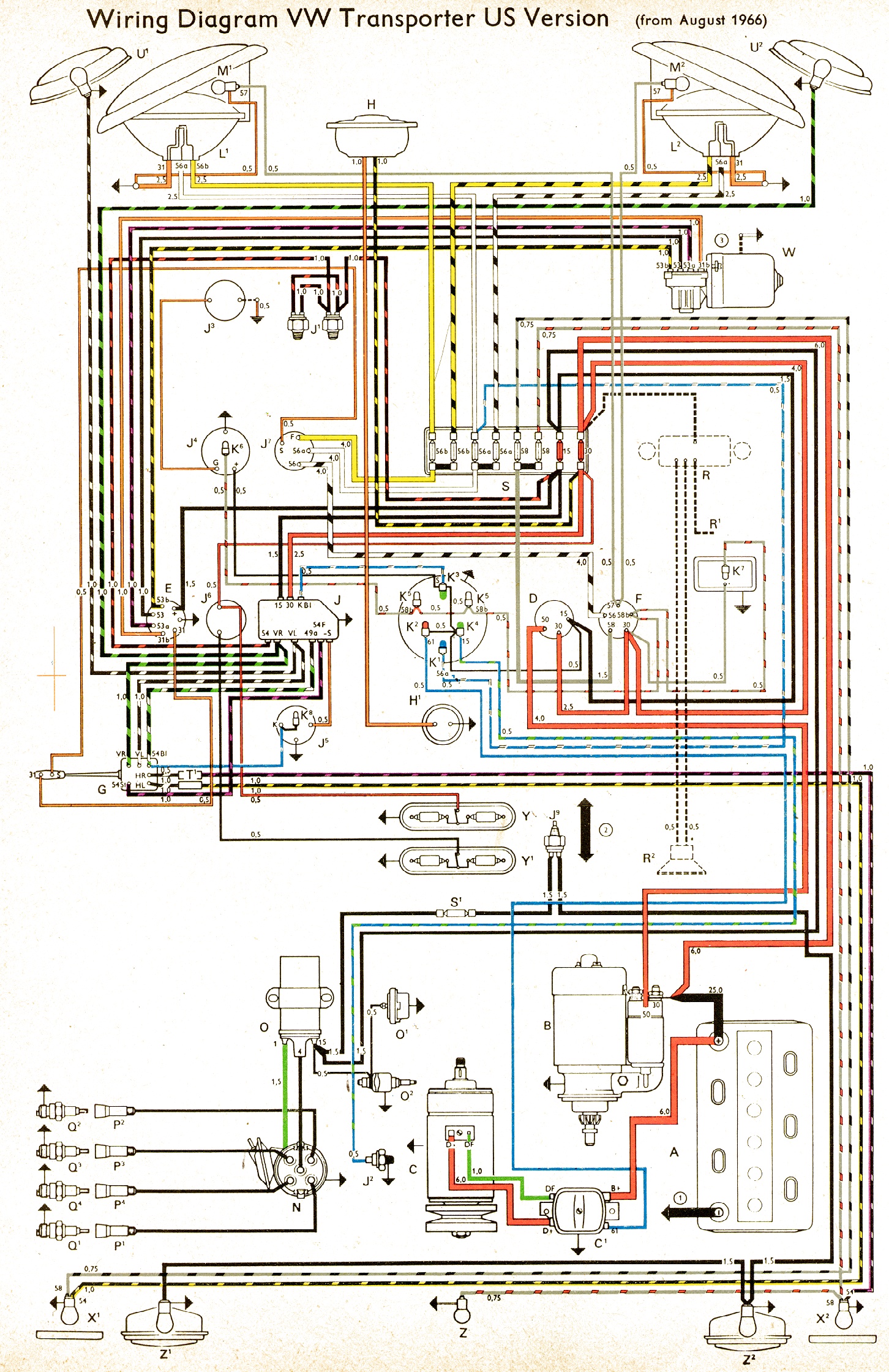
doc-t's problem must be caused by bad stoplight switches, a lack of power to them, a defective turnsignal switch or 9-prong flasher, or a broken/loose wire somewhere upstream of the output side of the t'signal switch (HR & HL):
http://www.vintagebus.com/wiring/bus-66-usa.jpg
-
doc-t
I looked at the wiring diagram. It shows the wire from the brake switch coming up to the "54" terminal (or "S4", can't tell which) of the 9-pin flasher box. I pulled off the kick panel and took my meter and tried to see if I got voltage on "54" with the key on and brake depressed. I didn't. However, I noticed that the color code of the wire is different than that shown on the color wiring diagram. The wire that comes to that pin is solid green verses black with a red stripe as shown in the diagram. I didn't even see a black with a red stripe coming out of the harness. I guess I've just found an excuse to take off that belly pan and sand and repaint it when I check the brake switches:( I have a brand new complete harnass that I bought months ago, but haven't had the courage to try and install it. Was kind of thinking I'd get an engine/transmission swap next year and let the shop guys put in the harnass at the same time. One thing sure, it looks awesome since I got it painted. I'll post some pics as soon as I get time to take some. A guy asked me if I wanted to sell it. I said "Sure, I want $10,000 for the bus and $90,000 for the sentimental value it has for me."
-
Marc
- Moderator
- Posts: 23741
- Joined: Thu May 23, 2002 12:01 am
What happens if you remove the wire from 54 and jumper 54 & 30 together? 30 should be hot all the time so when you do that the brakelights should come on...if they do the problem's somewhere with the brakelight switches, if not it sounds like the relay may be bad.
This article goes into detail about the relay:
http://www.type2.com/library/electris/vw-9prong.html
This article goes into detail about the relay:
http://www.type2.com/library/electris/vw-9prong.html
-
doc-t
-
doc-t
OK, I connected posts 54 and 30 and the brake lights came on. So, I took off the belly pan and got to the brake switches. I pulled off the spade connectors on the posts and cleaned everything, then they started working. Hooray!!! Didn't have to change the switches. One thing I noted is that sometimes I had to push the brake pedal pretty hard to get the tail lights to come on, and other times they came on with slight pressure. Any thoughts?
One more thing, while I'm on the subject and have the expert's ear, if I change a brake switch, do I have to bleed the brakes? It looks like they are activated by brake fluid pressure rather than being mechanical? If you take one out, does it let air into the system?
Thanks a bunch folks for all the help.
One more thing, while I'm on the subject and have the expert's ear, if I change a brake switch, do I have to bleed the brakes? It looks like they are activated by brake fluid pressure rather than being mechanical? If you take one out, does it let air into the system?
Thanks a bunch folks for all the help.
-
Guest